Nullam dignissim, ante scelerisque the is euismod fermentum odio sem semper the is erat, a feugiat leo urna eget eros. Duis Aenean a imperdiet risus.
Nullam dignissim, ante scelerisque the is euismod fermentum odio sem semper the is erat, a feugiat leo urna eget eros. Duis Aenean a imperdiet risus.
 author

A custom LCD display MOQ is rarely decided by one number at the final assembly line. It usually comes from several minimums underneath the finished module: the LCD panel, touch sensor, cover glass, FPC or cable, driver board, bonding process, fixtures, and packaging may all follow different purchasing rules. For equipment makers planning prototypes or low-volume production, the useful question is not simply “What is your MOQ?” but “Which part of my design creates the MOQ?” Understanding that distinction helps buyers compare quotations, avoid excess inventory, and decide where customization is worth keeping.
There is no universal custom LCD display MOQ because similar-looking products can have very different supply chains. A standard panel may be available from stock, while a version with custom glass, touch, FPC, or housing may require dedicated production.
A project built around existing TFT LCD modules can often start from a more flexible supply position than a project requiring a new structure. But even when the LCD is standard, the rest of the assembly may not be.
A printed cover lens, special touch sensor, non-standard connector, or dedicated cable introduces another supplier and another batch requirement. The final MOQ therefore tends to follow the least flexible component, not necessarily the most expensive one.
Buying only the LCD is different from ordering a module with touch, glass, bonding, cable, board, and frame. Each added process creates setup work, inspection steps, and material commitments.
That is why buyers should define the delivery scope before asking for an MOQ. Once the bill of materials is clear, the actual constraint becomes easier to identify.
The LCD panel is only one possible driver. In many equipment projects, the critical minimum comes from a secondary component added to make the display fit the product.
A practical review should separate every customized item and ask whether it is standard, who supplies it, and whether unused material must be purchased.
| Component | Why It Can Create an MOQ | What the Buyer Should Ask |
|---|---|---|
| LCD panel | Batch production or stock limits | Is it stocked or purchased against order? |
| Touch sensor | Dedicated size, controller, or FPC | Can an existing touch design be reused? |
| Cover glass | Printing, holes, coating, edge work | What process creates the minimum? |
| FPC/cable | Custom length, connector, pinout | Can a standard cable reduce the minimum? |
| Driver board | PCB fabrication and component buying | Is an existing board compatible? |
| Bonding/assembly | Setup and fixture requirements | Is there a separate setup charge? |
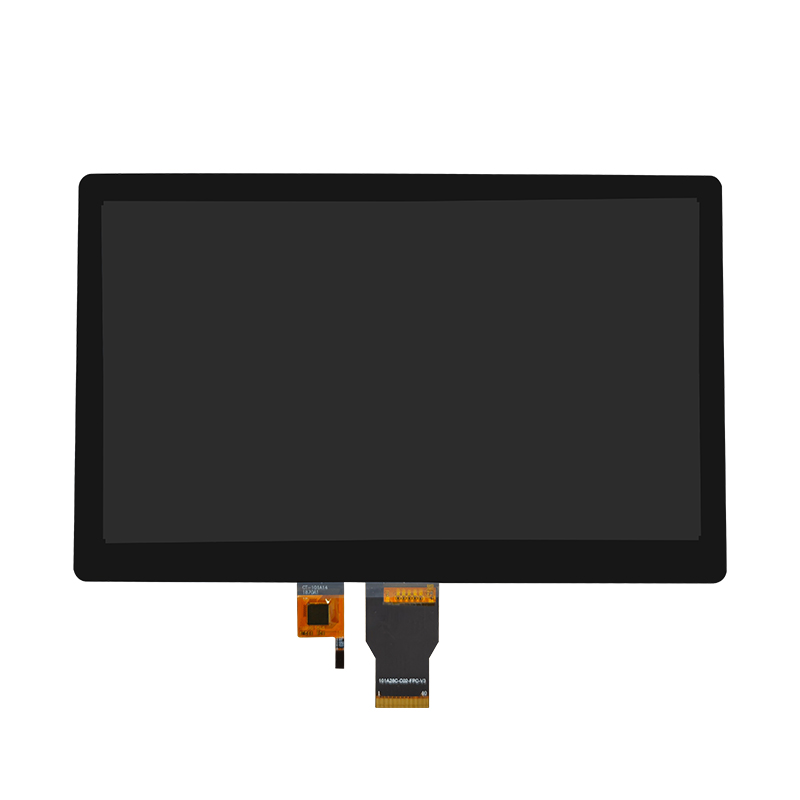
The 10-inch display assembly, touch screen assembly for industrial HMI human-machine interface shows why scope matters. Its published configuration combines a 10.1-inch display, 1920 × 800 resolution, LVDS interface, 500-nit brightness, and touch functionality.
For this kind of project, the supplier should identify whether the panel, touch construction, cover glass, or assembly process drives the minimum. That answer is more useful than one MOQ number at the bottom of a quotation.

Tooling and MOQ are related, but they are not the same. A buyer may pay a one-time engineering or tooling charge while material suppliers still impose separate production minimums.
Ask the supplier to distinguish tooling, fixtures, engineering work, samples, and production material. A cover-glass print screen or assembly fixture may be a one-time cost, while the glass processor still has its own batch requirement.
The same applies to custom LCD display assemblies. If touch, glass, frame, adhesive, or cables are included, the quotation should show which items create repeat purchasing commitments.
Low-volume buyers sometimes approve tooling too early to reduce unit cost. That can backfire if the enclosure opening, glass outline, cable direction, or connector position changes after system testing.
Freeze dimensions that affect customized parts before releasing tooling. If a standard component can support the engineering sample, validate fit and function first, then release the final custom item.
The goal is not to force every supplier toward the smallest possible quantity. A very low first order can become expensive if it depends on one-off manual work or components that cannot be repeated later. The better target is a design that remains reproducible.
Keep customization where it solves a real integration problem. If the project only needs a different cable, do not redesign the LCD. If the enclosure can accept an existing touch size, avoid creating a new sensor. If the host can work with an existing display solution board, compare that route with a new PCB.
This can reduce the number of suppliers, tooling items, and minimum batches tied to the project.
Give the supplier separate quantities for engineering samples, pilot production, first production, and expected annual demand. Also ask whether excess custom material can be carried into the next batch and what happens if the panel changes before that material is consumed.
A workable MOQ should fit both the buyer’s rollout plan and the supplier’s repeat-production process.

A useful MOQ discussion should end with a clear purchasing decision, not a vague promise to “support low quantity.” Buyers need to know what they are committing to now and what may change later.
The supplier should explain which component sets the minimum, whether the quantity applies to samples or production, and whether tooling, setup, or leftover material is charged separately. It should also be clear whether the quoted unit price assumes all material is consumed in one order.
Before issuing a purchase order, confirm the approved drawing revision, exact BOM, sample status, production quantity, lead-time basis, and treatment of unused custom material.
Ask about panel availability, alternative component rules, change notification, and what happens if a touch controller, cable component, or PCB part becomes unavailable.
The better question is not only “Can you make this first batch?” but “Can you make the approved configuration again when I need the next one?” That is the test that makes an MOQ commercially useful.
Dongguan SR Optoelectronics Technology Co., LTD. manufactures small- and medium-size LCD modules, including monochrome LCM and TFT products, and supports both standard and customized configurations. Its public company information states that the factory has four automated production lines and a monthly production capacity of 80,000 units. The company also presents small-batch production as part of its service approach. For buyers evaluating a custom LCD display MOQ, the practical starting point is to submit the display size, interface, touch or cover-glass requirements, mechanical drawing, sample quantity, pilot quantity, and annual forecast. The final MOQ should then be confirmed against the actual panel, custom materials, tooling scope, and assembly process rather than assumed from screen size alone.
Custom LCD display MOQ varies because the finished module combines components with different purchasing and production constraints. The panel may be flexible while touch, printed glass, cable, PCB, or bonding sets the real minimum. Buyers can reduce risk by identifying the MOQ driver, separating tooling from material commitments, standardizing non-critical parts, and planning sample and production quantities separately. Before approving a quote, confirm what creates the minimum, what unused material remains, and whether the same configuration can be supplied again.
There is no single typical MOQ for every project. The minimum depends on the panel, touch sensor, cover glass, cable, board, tooling, assembly process, and supplier availability.
Often, yes. A standard panel can remove one custom purchasing constraint, although touch, glass, cables, boards, or mechanical parts may still set the project MOQ.
Not necessarily. Tooling covers dedicated engineering or production equipment, while material suppliers may still impose separate batch minimums for glass, FPCs, touch sensors, PCBs, or other components.
Samples may use stocked parts, engineering material, or small-process runs. Production MOQ reflects repeatable sourcing and manufacturing conditions, so it can differ from the quantity used for validation.
Send the display size, resolution, interface, mechanical drawing, touch and cover-glass requirements, cable or board needs, sample quantity, pilot quantity, annual forecast, and production schedule.